Geometry

GP Travel Enterprise — Operations and Reservations

Manage Reservations and Daily Operations in One Back Office

When a quotation becomes a booking, you do not have to retype anything. The back office built into GP Travel Enterprise carries it through every amendment and payment status.


World's Best Travel ERP Solutions Provider Winner 2023 of World Travel Tech Awards

World’s Best Travel ERP Solutions Provider 2023

GP Solutions has been recognized as the World’s Best Travel ERP Solutions Provider 2023 at the prestigious World Travel Tech Awards. This accolade, voted by travel industry professionals, media, and consumers globally, underscores our excellence in delivering innovative, scalable, and efficient ERP solutions tailored to the dynamic needs of the travel sector.
View certificate
World's Best DMC Software Provider Winner 2023 of World Travel Tech Awards

World’s Best DMC Software Provider 2023

We are proud to be named the World’s Best DMC Software Provider 2023 by the World Travel Tech Awards. This recognition highlights our commitment to revolutionizing the destination management sector with cutting-edge software solutions that drive operational efficiency and seamless customer experiences.

View certificate
Amadeus Certified Partner

Amadeus Partner Network

As a certified development partner of Amadeus, one of the world’s leading Global Distribution Systems, GP Solutions leverages Amadeus’ state-of-the-art technology to create highly customized, robust travel solutions. Our partnership enables us to deliver exceptional services that meet the evolving needs of travel businesses globally.

Sabre Developer Partner 2026

Sabre Developer Partnership

GP Solutions is an esteemed member of the Sabre Developer Partner Program, empowering us to build and integrate high-performance travel technology solutions on the Sabre platform. Our collaboration with Sabre ensures that we deliver top-tier solutions with unmatched functionality and scalability for the global travel market.

View certificate
Associate Member at USTOA United States Tour Operators Association

USTOA Associate Member

As part of USTOA’s network, we endorse the association’s mission in promoting professionalism, social responsibility, and innovative approaches within the industry. Our participation in travel tech events, knowledge sharing, and regular collaboration with industry stakeholders are examples of how we spread travel tech within the tour operator community of the United States and abroad.

Learn more
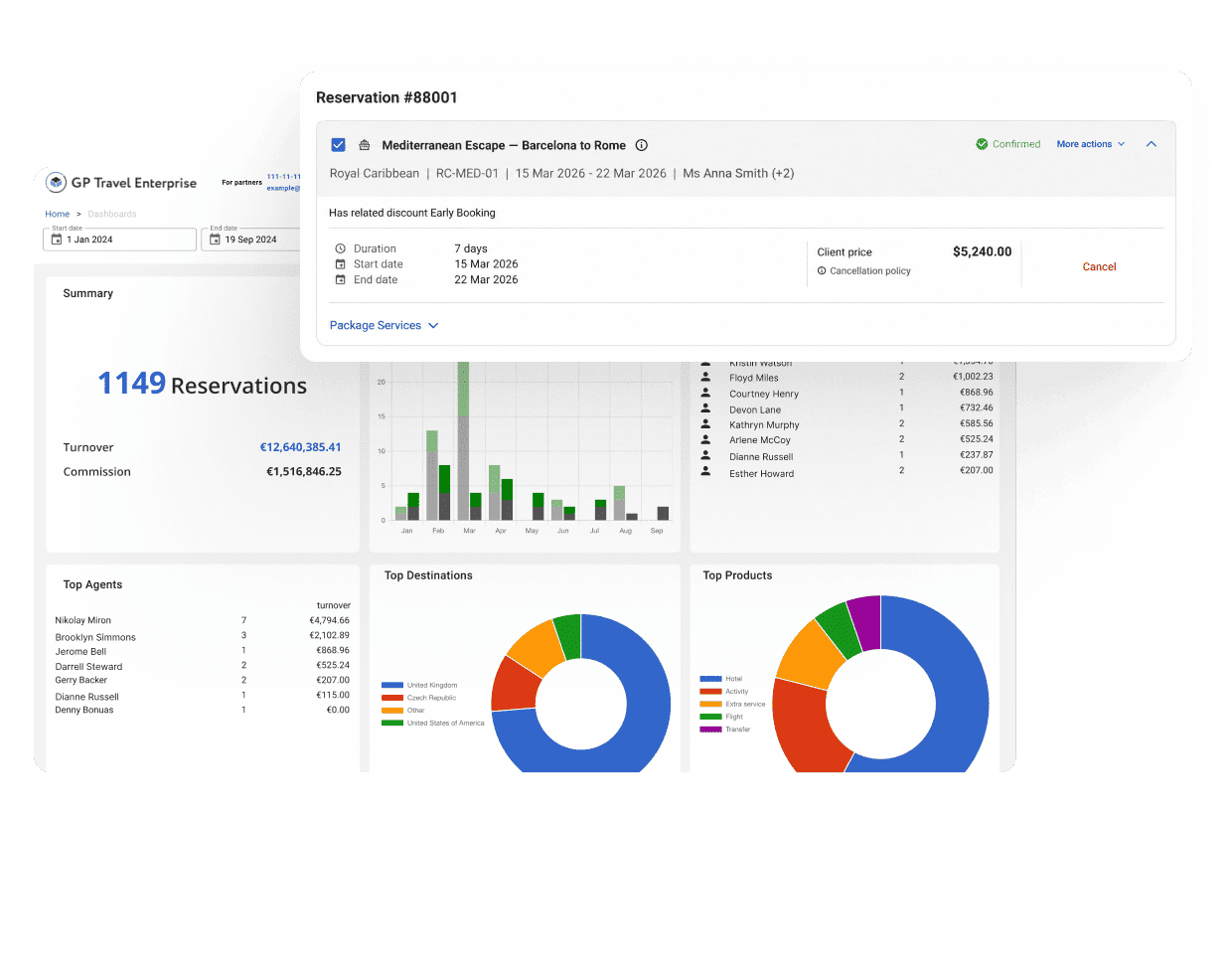
Dashboard showing a travel reservations panel with 1,149 reservations, turnover and commission figures, and multiple charts (bar, donut) across top and bottom sections; overlayed reservation details dialog is visible on top

Travel Technology With a Track Record

Years

20+

in travel technology

Clients

300+

clients served

Retention

94%

client retention rate

Countries

30+

where our clients operate

Engagement

10+

years, average client engagement

From First Request to Final Invoice

GP Travel Enterprise brings the work around every booking into a single environment.

One Order

Keep a multi-service trip together as a single order, with travelers, services, prices, statuses, and history in one place.

One Workflow

Automate confirmations, cancellations, quality checks, and payment schedules, and send only the exceptions to your team.

One Back Office

Run reservations, documents, users, customer data, and reporting from the same system.

Manage Every Reservation from One Workspace

Every reservation lands in the same place, whether it came from your B2C website, your B2B partner workspace, the API, or your own sales team. Your team sees the full order and acts on it without switching screens.

01

See Every Reservation at a Glance

View all reservations on a single screen with flexible filters. Check each order’s stage: Quote, In progress, Completed, Canceled, or any status you define yourself. Assign a dedicated manager to each order.

02

Keep Complex Trips as One Order

Combine products and services in one multi-service order. Add extras and upgrades at any point in the order lifecycle.

03

Amend Bookings in Place

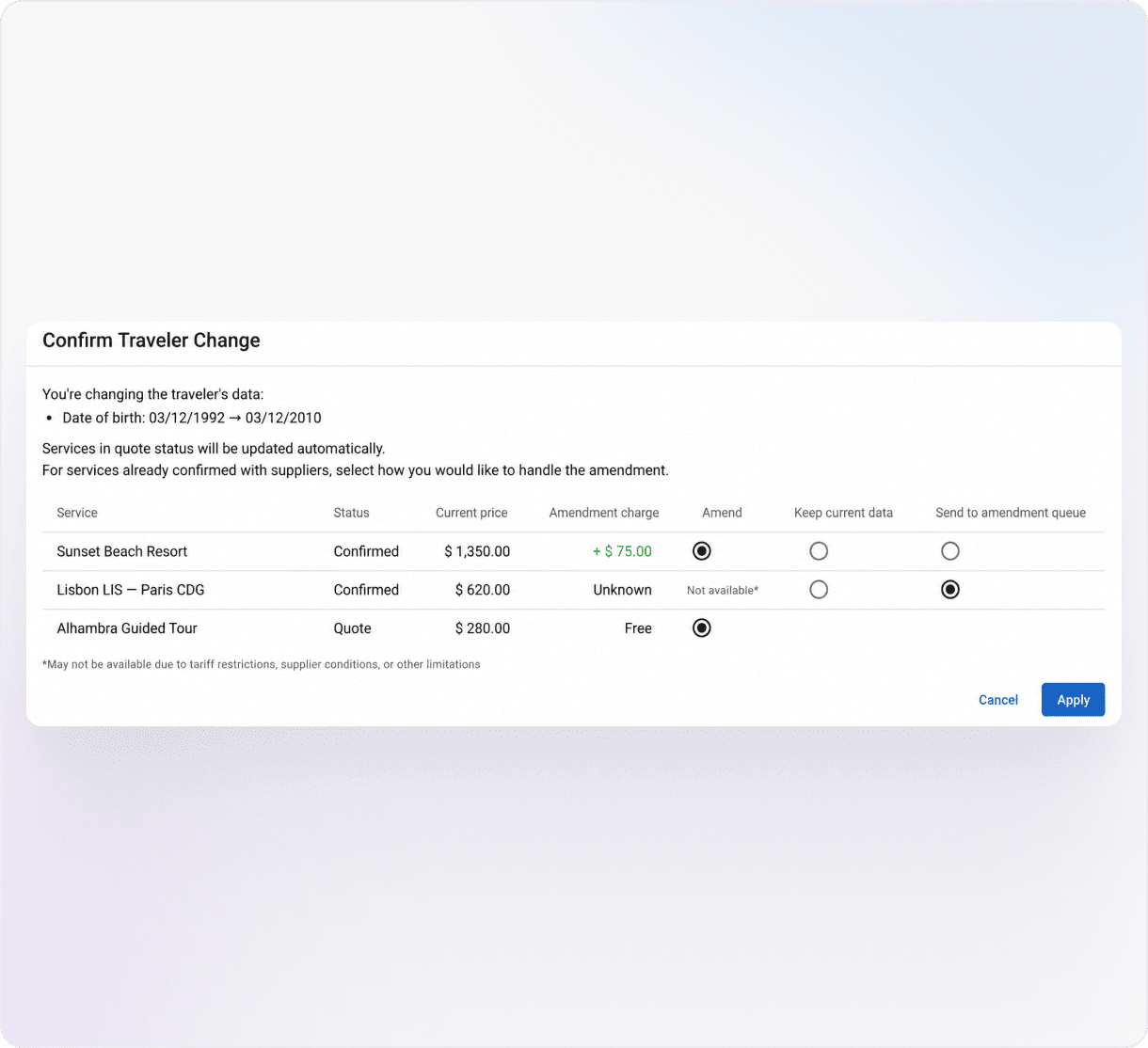
Change services, prices, or traveler details on the existing order, with every change saved to its history. Replace a service after booking, depending on the product type.

04

Manage Traveler and Booking Data

Store traveler details directly in the reservation. Configure booking fields, classify orders by your own criteria, and leave internal notes for colleagues on the same screen.

05

Stay in Control of Every Change

Track every action through the full order history and audit trail. Lock finalized reservations to prevent accidental edits, archive completed orders to keep the workspace clean, and update many orders at once with mass edit.

Reservation management table with columns for Client, Status, Service, Dates and Prices; first entry shows S. Martinez booking at Hotel Ritz Paris, 5–9 Jun 2026, paid.
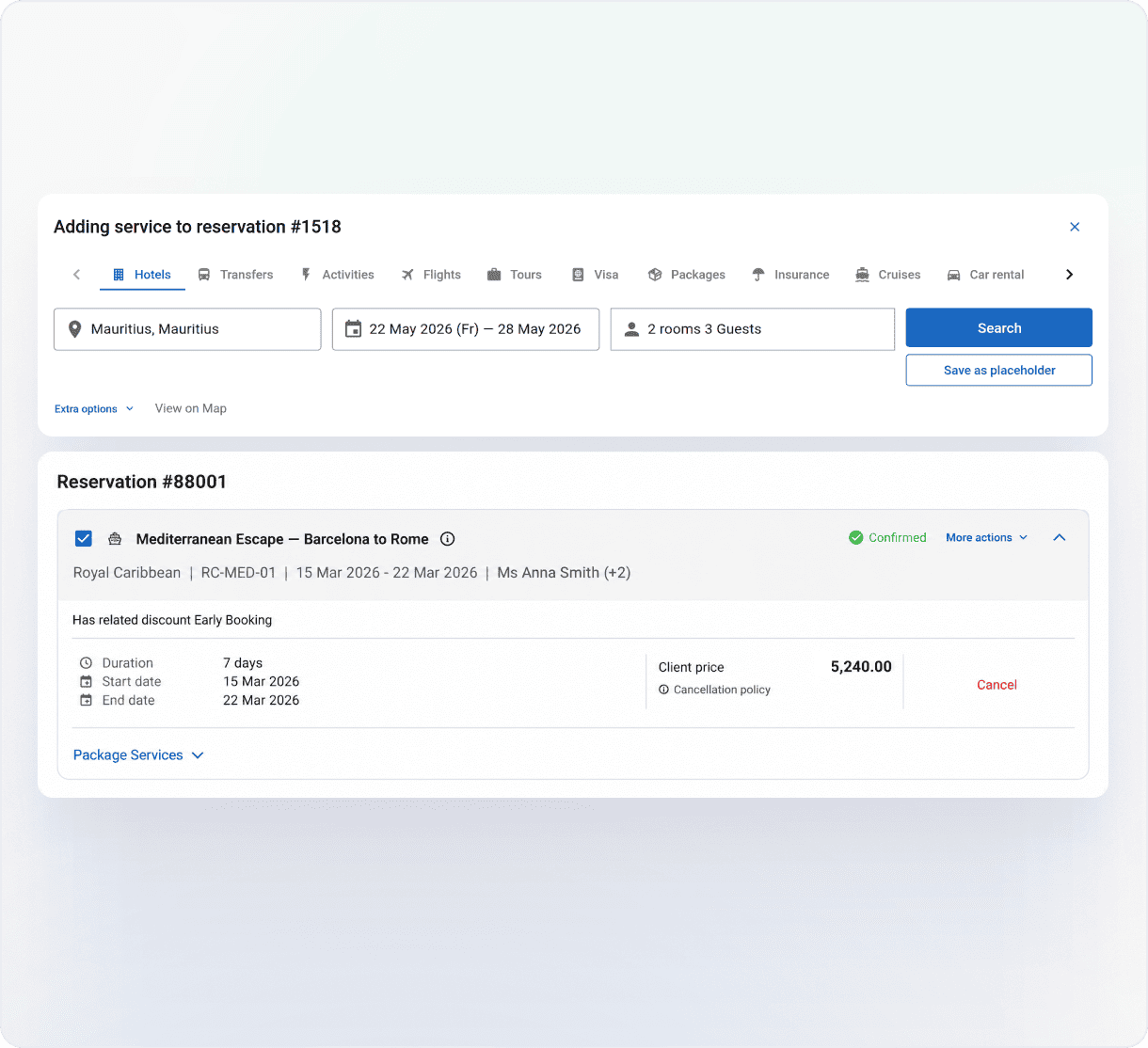
Web UI for adding a service to reservation #1518, showing hotel search inputs, dates, guests, and a confirmation section.
Modal titled 'Confirm Traveler Change' with a table of three services, showing status, price, amendment, and options, plus Cancel and Apply buttons.
Left: hotel booking panel showing two adults—Mr James Walker and Mrs Emma Walker—with room and extra details; right: a woman at a desk looking at a computer monitor in an office with a world map on the wall
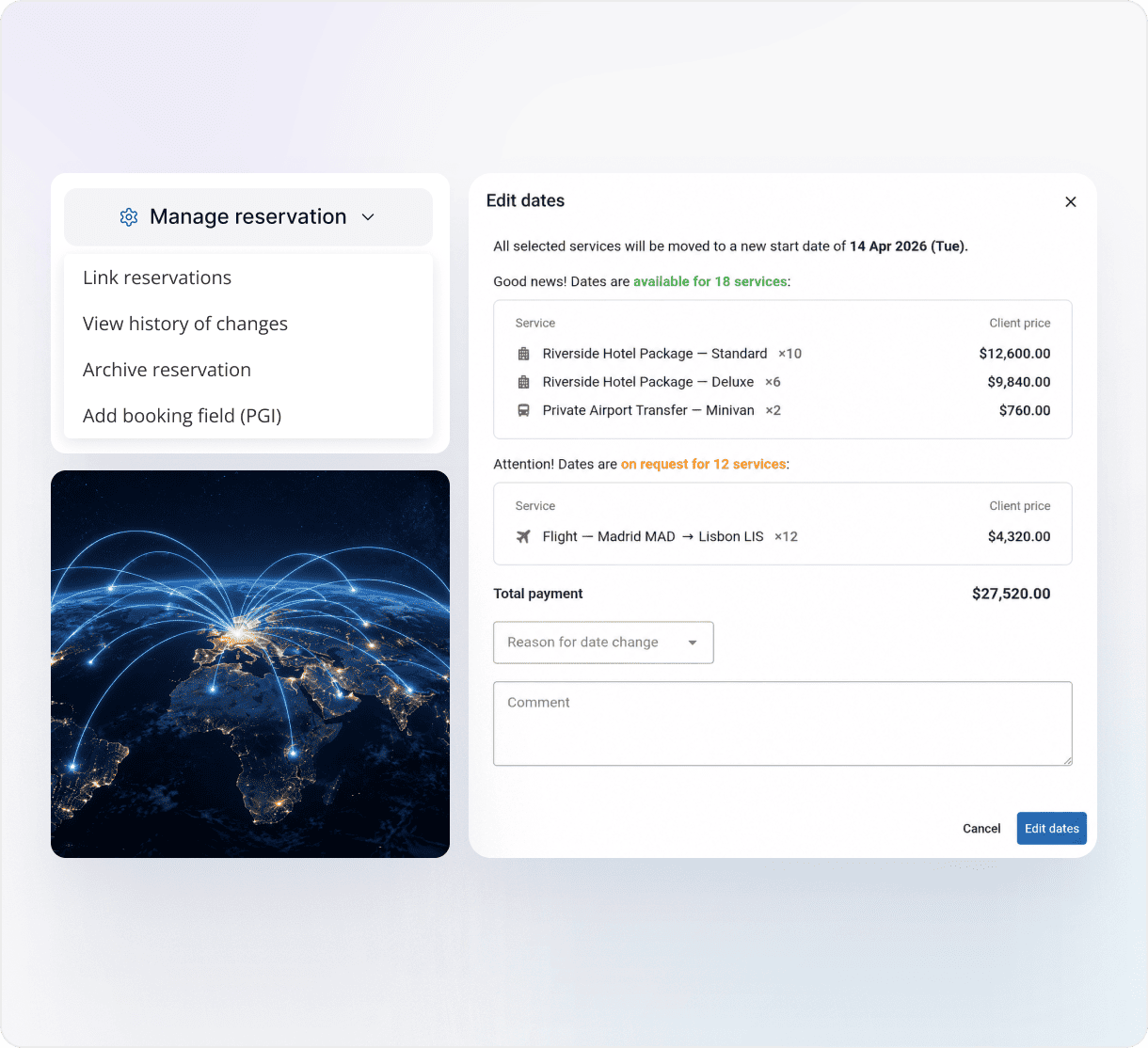
Dashboard UI for managing reservations: left navigation with 'Manage reservation' and options, right-side 'Edit dates' dialog showing services and totals, plus a globe image below on the left.

Automate the Work Behind Every Reservation

Confirmations, cancellations, and payment deadlines take hours when someone handles each one by hand. GP Travel Enterprise runs them as automated, multi-step processes and hands only the failures to an operator.

Run Tasks in the Background

Bookings, cancellations, traveler updates, and emails move through automated queues with retries. Your team keeps working while the system finishes the job.

Catch Gaps Before Your Client Does

Automated quality checks flag problems in a booking, such as a night without accommodation, before anything reaches the traveler.

Replace Accommodation Across Bookings at Once

When a supplier cancels, replacement queues swap the hotel across every affected booking. Prices update automatically, and the rest of the itinerary stays as it was.

Apply Your Business Logic Automatically

Define your business rules once, and a rule engine applies them dynamically across the platform. Structured workflows move each process through a defined sequence of steps.

Schedule Reservation-Level Actions

Set an action to run at a specific time or when a condition is met, and the system handles it on every reservation. The scripts run in the background, so nobody on your team has to keep a calendar of reminders.

Coordinate the Delivery of Every Trip

A confirmed booking still has to happen on the ground. With Scheduler within GP Travel Enterprise, you can plan private and shared transfers and excursions for every traveler.

Scheduler gives you the ability to:

  • Assign a guide, driver, and vehicle to each group
  • Split travelers into separate groups or merge them when they share a program
  • Pull flight arrival and pickup details directly from each booking
  • Track each group’s status from open to completed
  • Generate daily summaries and traveler lists for guides and drivers, exported to Excel
Travel booking dashboard listing three new tours with times and locations, plus a calendar and a bus boarding photo on the right.
Niko from GP Solutions

Tell us how a typical trip moves through your team today. We’ll show you how it would run in GP Travel Enterprise, from reservation to ground delivery.

Niko
Business Development Expert

Generate Documents and Notifications Automatically

Every document and message draws on data already in the system. Vouchers, invoices, and emails pull booking details straight from the order.

Invoice 47 page with customer details and line items on the left; a smiling man reads documents at a desk on the right.

Documents

  • Generate and send branded vouchers, itineraries, and e-tickets automatically
  • Produce quotations, invoices, and rooming lists on demand
  • Attach supporting files or documents generated from templates
Settings table for Reservation service listing actions (Add review, Booking cancellation, Booking creation) with language columns and status toggles; Booking confirmation popover.

Notifications

  • Send emails for booking confirmations, cancellations, payments, and other events
  • Set a separate template for each event type
  • Notify the right people: notification settings per company, per employee, and per contracted hotel.

Run Finance on Your Booking Data

Finance runs on the same reservation data your operations team uses, so invoices and payments stay in step with what’s actually booked. Manage money for both customers and suppliers, in multiple currencies.

Take Payments Your Way
Configure the payment methods you accept, including bank transfer, cash, and online payment gateways. Track every client payment against its order.

Set Payment Schedules, Deposits, and Credit Limits
Build payment schedules with deadlines the system tracks automatically. Manage deposits, credit limits, and refunds from the same screen.

Issue Invoices and Statements
Issue standard and manual invoices. Generate a statement of account for any client or supplier to reconcile what’s been invoiced against what’s been paid, and export it to Excel.

Manage Currencies and Exchange Rates
Run finance in multiple currencies with built-in exchange rate management. Pull rates from ECB or CurrencyLayer, or enter them manually, and keep a full history of manual rates. Apply markups on cross-currency rates when you convert prices between currencies.

Connect Your Accounting System
Send financial data to external accounting and finance systems through the API. Connecting to external payment providers is covered in Gateways and Connectivity.

Let Our Clients Speak

“GP Travel Enterprise by GP Solutions has been a game-changer for our B2B DMC business. The ease of use and flexibility of the platform have allowed us to build a high-load system that can process millions of searches per day.”

Calire

Claire Matanda

Member of the Management Board, Abbey Tours, Ireland & UK
Abbey

“We’re impressed with GP Solutions’ willingness to always find a way to make things happen. It is a very honest relationship we have with our dedicated team within GP Solutions, and they really do feel like an extension of our own company. This isn’t something you find every day.”

Josea Browne

Josea Browne

Managing Director, BookBarbados.com, Barbados
Book barbados

“GP Solutions delivered a robust, scalable system that became the backbone of our wholesale travel operations. The platform’s adaptability, automation, and integration capabilities have transformed our workflow, saving time and reducing errors. A few advanced features required brief familiarization, but GP Solutions’ support team helped us quickly get up to speed. Highly recommended for travel businesses seeking a tailored, future-proof solution.”

John Polyviou

John Polyviou

General Manager, Sun Island Tours, Australia
Sun Island Tours

Manage Users, Teams, and Customer Context

Control who works on each booking, and give your team the customer history they need.

Users and Permissions

Manage the full user lifecycle in one place:

  • Create users, assign roles, group them by department, and allocate them to service teams
  • Control access down to the individual action with 1,000+ permission identifiers, organized by functional domain
  • Sign in with single sign-on
  • See who changed what in the change history

Customer Relationship Management

Keep customer context next to every booking with the built-in customer management module:

  • Build customer profiles for individual travelers and B2C accounts, with contact details, passport and travel documents, travel preferences, required traveler information, and emergency contacts, all linked to the customer’s online booking account
  • Log every call, meeting, email, and internal note, with attachments, reminders, and a full change history
  • Plan and budget marketing campaigns, then link them to opportunities to track revenue
  • Segment clients by membership level and tailor tariffs, discounts, extra services, and payment methods to each level.

See What’s Happening Across Your Operations

Reporting runs on the same reservation and financial data as the rest of the back office. Your managers see real numbers without exporting and merging spreadsheets.

  • Track performance with pre-built KPI dashboards
  • Run dozens of analytical reservation and financial reports
  • Customize operational reports around the questions your business asks
  • Analyze clients and bookings with built-in data visualization
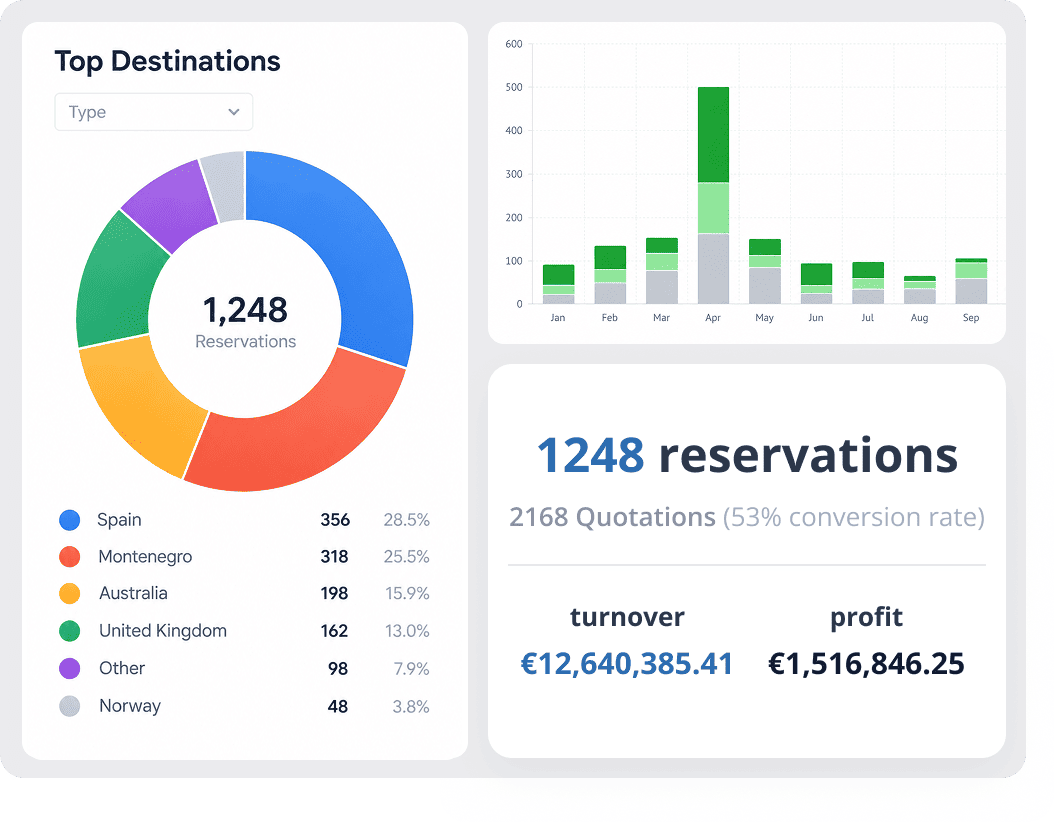
Dashboard with a donut chart of reservations by country (1,248 total), a monthly bar chart, and turnover/profit cards.

Adapt the Back Office to Your Operating Model

Two glowing UI panels: left panel labeled Custom Field with Field type Text, Label Passport number, and toggle switches for Required and Show at booking; right panel titled PGI fields listing passenger details, contact information, travel documents (highlighted), special requests, and loyalty data with icons.

Custom Fields and PGI

Define custom fields for products and reservations and collect the values during booking. Use Personal General Information (PGI) fields to tag structured data at the product-type and reservation level.

Glowing blue infographic showing a 'Company structure' panel with Your Company, Brand A, Brand B, linked to a 'Tariff group' panel and a 'Booking rules' panel.

Reference Data

Define your company structure, commercial settings, and booking logic once, in central dictionaries. Set up groups and sub-groups of companies, tariff groups, rounding rules, and client payment schedule strategies, along with order statuses and service link types. The platform applies them consistently across every booking.

Futuristic blue UI mockup with a left navigation pane and a main panel labeled 'News and Tips' showing three tip cards; a glowing secondary panel to the right is connected by a curved line, displaying 'New supplier integrated'.

News and Tips

Publish internal news and contextual tips for back-office users. Set conditions for when and where each message appears.

Were Boookings Come From

Bookings reach this back office from the rest of GP Travel Enterprise: your contracted product, third-party supply, and every sales channel you run.

Block 1

Product and Inventory

Contract and manage your own rates, availability, and product rules.

Travel booking page with category buttons above; left image shows a hotel receptionist at a desk, right image shows a red SUV on a mountain road.
Block 2

Supplier Integration

Bring third-party supply from 80+ suppliers into the same environment.

Panel showing a filterable supplier table with four rows, checkboxes on the left; Aura Travels VIP (ARTRVLS, code 1shf8) is an internal supplier for United Arab Emirates — Dubai; Carnet (alias 8l) external supplier for Germany — Hamburg; Hotelbeds (6a) external supplier for Spain — Palma De Mallorca; Intui (95) external supplier for United Kingdom — London. A row header includes Company name, Alias, Company Code, Type, Country, City with a Filters control at the top. Logos for Amadeus, Viator, SiteMinder, Rate Hawk, and “80+ Suppliers” appear below the table.
Block 3

Sales and Distribution

Sell through B2B, B2C, and API channels from one catalog.

Discount creation form with name Promo2025, 10% off, Hot Deal selected, and promo code rule UVOV8.
Block 4

Gateways and Connectivity

Connect GP Travel Enterprise to payment gateways and the systems you already run.

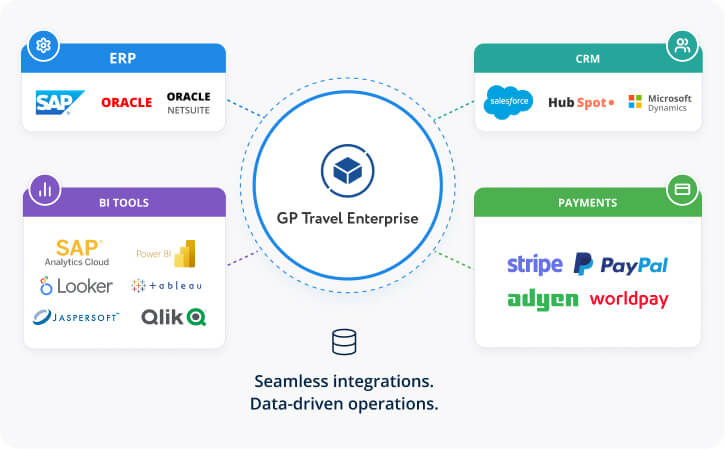
Diagram with GP Travel Enterprise at center connected to ERP, CRM, BI tools, and Payments modules, showing integrated logos (SAP, Oracle, Salesforce, Stripe, etc.).
Block 5
You are here

Reservations and Operations

Run the bookings, workflows, documents, and finances behind every sale.

Dark reservations dashboard listing multiple bookings with status and prices.

GP Travel Enterprise

100+ modules

1

Product and Inventory

2

Supplier Integration

3

Sales and Distribution

4

Gateways and Connectivity

5

Reservations and Operations

Built for Complex, Multi-Day Operations

GP Travel Enterprise is built for mid-to-large tour operators and DMCs managing complex, multi-service, multi-day travel products.

GP Travel Enterprise fits best if your business handles:

  • Multi-service reservations that combine hotels, transfers, excursions, and flights
  • Frequent amendments and supplier cancellations
  • Several teams, departments, and offices working on the same bookings
  • Payments, invoices, and reports in multiple currencies
  • Group bookings, allotments, and on-the-ground logistics

Recognize your business?

Let’s talk about how your operations would run in GP Travel Enterprise.

Frequently Asked Questions

Can we amend a complex reservation without canceling and rebooking?

Yes. You change services, prices, or traveler details on the existing order, and every change goes into the order history. You can also replace a service after booking, depending on the product type.

Can GP Travel Enterprise automate confirmations, cancellations, and other operational tasks?

Yes. Confirmations, cancellations, quality checks, hotel replacements, traveler updates, and emails run through automated queues with retries. When a task fails, it goes to an operator.

Can we manage transfers and excursions after a booking is made?

Yes, with Scheduler. You can assign guides, drivers, and vehicles, and generate daily lists for your field teams.

Can we handle invoices, payment schedules, deposits, and multiple currencies?

Yes. The back office covers payment methods, payment schedules, deposits, credit limits, refunds, invoicing, and statements of account. Exchange rates come from ECB, CurrencyLayer, or manual input.

Can we control what each employee can access?

Yes. We provide 1,000+ permission identifiers, so you can control access down to the individual action. Single sign-on and a full change history are included.

Can we run operational and financial reports from the same system?

Yes. You get pre-built dashboards, dozens of reservation and financial reports, and customizable operational reports, all built on the same data.

Can we add our own fields and data to reservations?

Yes. You define custom fields for products and reservations and collect them during booking. PGI fields add structured tagging at the product-type and reservation level.